
Introduction
The primary goal of Consent Mode V2 in GA4 is to help website owners comply effectively with data privacy laws, such as the European Union’s General Data Protection Regulation (GDPR) and California’s Consumer Privacy Act (CCPA). It works by allowing users the choice over whether their sessions can track certain personally identifiable information. So how does this affect reporting?
In this article, we will explore the specifics of Consent Mode v2 and examine how the different implementations of consent mode impact data collection and reporting in both the GA4 Data API and GA4 BigQuery export. We also explain why user and session counts in BigQuery are lower than in the Web UI and API, and how your calculations need to adjust to account for the absence of data in some fields.
To chat more about the implications of Consent Mode V2 on your reporting, contact us.
Analytics Canvas is a platform for GA4 reporting and analysis with various tools to ensure the accuracy and consistency of your data. Sign-up for a free trial or connect with our team for a demo and discussion about how Consent Mode V2 affects your reporting.
What is “Consent” as it relates to GA4?
In the context of Google Analytics 4 (GA4), “consent” refers to the explicit permission given by users to collect, process, and store their “personal” data.
At a high level, in Basic Consent Mode, data collection is only from users who have explicitly given consent. Whereas with Advanced Consent Mode, data collection is from all users and any identifiable details are anonymized for those users who deny consent.
What is Google Consent Mode v2?
Google released Consent Mode v2 in November 2023 to align with the Digital Markets Act, which took effect in mid-2024. Like the original version, v2 communicates users’ consent choice to Google services, such as Google Analytics 4 and Google Ads. Data collection adjust to respect user choices depending on the implementation of Consent Mode.
This new version introduces stricter rules around consent management and offers more granular control over data collection and processing. To provide these enhanced controls, Google added two new Consent Mode parameters. These new parameters expand on the two that existed in the original version.
Here is a list of all the Consent Mode parameters in Consent Mode v2:
| Dimension / Parameter | Definition |
|---|---|
| analytics_storage: | Controls whether Google can read/write analytics cookies and collect app instance IDs for analytics. |
| ad_storage | Controls whether Google can read/write advertising cookies and collect app device IDs for advertising. |
| ad_user_data (NEW) | Controls whether Google Ads can receive user data for advertising purposes. |
| ad_personalization (NEW) | Controls whether Google Ads can receive user data for advertising purposes. |
Consent Mode: Basic vs. Advanced Implementation
In addition to the parameters, Consent Mode v2 introduces two different implementation modes for consent. These modes are Basic Consent Mode and Advanced Consent Mode. Let’s dive into the details of each below:
| Basic Consent Mode | Advanced Consent Mode |
|---|---|
| In this mode, the website fires Google services only if a user grants consent. If the user does not grant or denies consent, the website shares no data with any Google service. Essentially, Google collects data only when users grant consent. | In this mode, the website can continue to fire Google services, and Google will adjust the collection of information based on the user’s consent choice. If a user provides consent, Google services will collect information as normal. However, if the user denies it, Google still collects anonymous information for data modeling purposes. |
For implementation purposes, note that Consent Mode V2, like the original Consent Mode, does not provide a consent banner or widget. Instead, it interacts with your existing consent banner to obtain and respect visitor consent. To learn more about managing user consent, explore the Google Support Page – Introduction to user consent management.
Finally, the implemented Consent Mode affects data collection and reporting in different ways. Later in this article, we will explore how Basic and Advanced modes impact data collection and reporting when using the Google Analytics 4 User Interface and BigQuery export.
Consent Mode: privacy_info Fields in GA4 BigQuery Export
Before diving into how each Consent Mode affects data collection and reporting, let’s examine the key to the GA4 BigQuery export for Consent Mode. In the GA4 BigQuery export, Google’s introduced a new record called privacy_info in 2021. This record captures the consent state through three important fields:
| Dimension | Definition |
|---|---|
| privacy_info.analytics_storage | Indicates if analytics services can fire. |
| privacy_info.ads_storage | Indicates if ads services can fire. |
| privacy_info.uses_transient_token | Indicates if, in cases where the user denies consent, there is code that has enabled measurement without cookies via server data. (very advanced implementations only) |
For all three fields, the possible values are:
- Yes: Consent granted.
- No: Consent denied.
- Null: No consent mode or unknown state.
We’re using the Analytics Canvas BigQuery SQL Builder to generate our queries, but you can find the same results by running your own SQL in the BigQuery console.
You are able to query the privacy_info record and its three fields using the Analytics Canvas BigQuery SQL Builder. Simply include the field when making your query:

Now, let’s dive into the specifics of Basic and Advanced Consent Mode and how they affect data collection and reporting.
How Consent Mode Affects GA4 Data Collection and Reporting
Basic Consent Mode
With a Basic Consent Mode implementation the website only fires Google services if a user grants consent. If the user denies or does not grant consent, Google does not share any data with its services. Let’s explore the two scenarios with Basic Consent Mode below.
Scenario #1 – Basic Consent Mode – User Does Not Grant or Denies Consent
In this scenario the user interacting with the site is either ignoring the consent banner or has explicitly denied consent. Without consent, Google services will not collect data. As a result, Google Analytics 4 does not collect any data. Simply put, they do not record any information about the user’s interactions.
Scenario #2 – Basic Consent Mode – User Grants
In this scenario the user interacting with the site has granted either all or some consent through the consent banner. By granting consent, the user is allowing either all or some of the Google services to trigger and collect information.
For Google Analytics 4 and BigQuery to collect any data, the user must grant analytics consent. This means that in the BigQuery export the privacy_info.analytics_storage value will always be Yes. However, the privacy_info.ads_storage can be either Yes or No, depending on if the user granted consent for ad services.
When it comes to reporting, as long as the user grants consent for analytics, data will be collected and therefore available for reporting in both GA4 User Interface and BigQuery. However, note that with Basic Consent Mode implementations, both the Web UI Reports and BigQuery may have limited data available compared to Advanced Consent Mode implementations, as we are only collecting data from consented users. For a Basic Consent Mode implementation, it’s critical to focus on identifying trends and patterns. Additionally, allow for extra time to gather sufficient data, as the reduced data volume may require longer periods for meaningful insights.
Advanced Consent Mode
As described earlier, with Advanced Consent Mode the website can continue to fire Google services. However, Google will adjust the collection of information based on the user’s consent choice. If a user provides consent, Google services will collect information as normal. However, if the user does not grant consent, Google collects anonymous information that can be used for data modeling. Advanced Consent Mode makes data collection and reporting a bit more tricky, so let’s dive into the details.
Scenario #1 – Advanced Consent Mode – Denies Consent
In this scenario the user interacting with the site has explicitly denied consent. When that happens, Google services will continue to fire but in a cookie-less state (Learn More . This means that Google Analytics 4 will continue to collect information. However, when collecting that data, any identifiable data related to the user, such as user_pesudo_id or session_id, is omitted.
Furthermore in the BigQuery export the privacy_info.analytics_storage value will be “No”. For those records, Google will still collect data but any identifiable information like user_pesudo_id and session_id will be null.
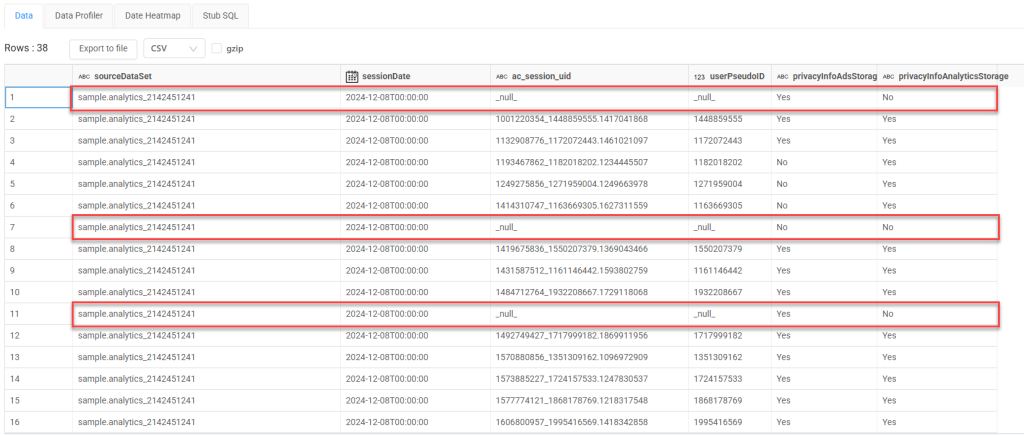
Since user_pseduo_id and session_id are used to calculate Users and Sessions in BigQuery, having a null value for users who opted out of tracking means that you will no longer be able to get accurate User and Session counts using the BigQuery export. The values reported out of BigQuery will likely be lower than the Web reports and API since those surfaces have modeling applied. For a deeper dive into data modeling in Google Analytics, check out this article: About consent mode modeling.
Scenario #2 – Advanced Consent Mode – User Grants Consent
In this scenario the user interacting with the site has granted some or all consent through the consent banner. By granting consent, the user is allowing some or all Google services to trigger and collect information.
In the BigQuery export the privacy_info.analytics_storage value will be Yes, and those records will include identifiable information such as user_pesudo_id and session_id. As we have those identifiers, reporting is less affected as these rows contain identifiers, allowing for user and session counting of consenting users.
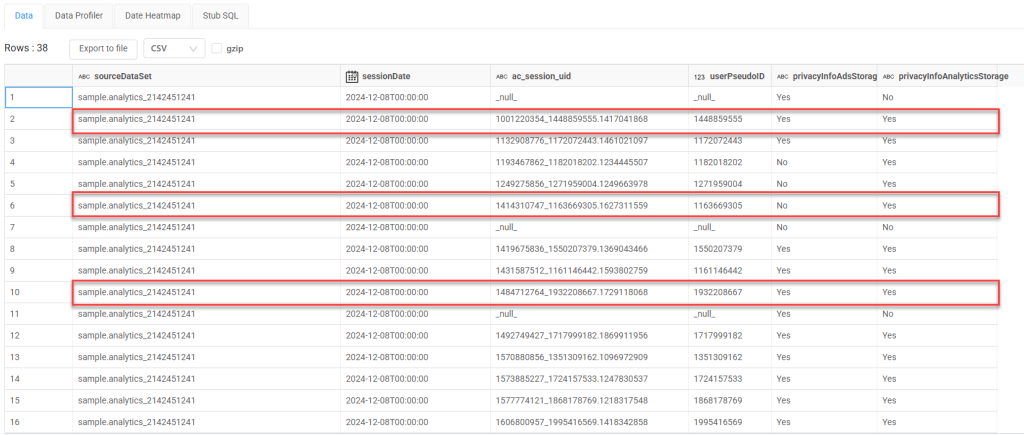
However, it’s crucial to remember that with Advanced Consent Mode, your GA4 BigQuery export will likely contain a mix of rows with granted consent (including identifiers) and rows without consent (lacking identifiers).
This mixed dataset requires careful consideration when creating reports as:
- Metrics using User Counts (Active Users, New Users) that rely on user_pesudo_id will be skewed as the user_pesudo_id will not be present in GA4 BigQuery
- Metrics using Session Counts (Session, Bounce Rate, Pageviews Per Session) that rely on session_id will be skewed as users that deny consent will not have a session_id in GA4 BigQuery
Data modeling may be applied to non-consent data in the User Interface and API if the property meets certain criteria. However, this modeling does not apply to GA4 BigQuery. As a result, the numbers in GA4 BigQuery, the GA4 UI, and the GA4 Data API will not match.
Note: for both Basic and Advanced, if consent is later granted on the same page, the data in BigQuery will be reprocessed to show the user granted consent and the previously denied records will be updated to show consent was granted. Simo Ahava, outlines this in his article – Consent Granted Reprocesses Previously Denied Hits.
How Analytics Canvas helps Consent Mode V2 implementations
Now that we have covered the different modes of consent and how they affect data collection and reporting, its time to dive in to see how Analytics Canvas can help!
One of the main advantages of Analytics Canvas is the ability to make quick updates to existing queries without stressing about the complex SQL. In the Analytics Canvas BigQuery SQL Builder, users can simply include the new privacy_info record fields without writing a single line of SQL.
For those working with Advanced Consent Mode, Canvas has tools to separate “consent” data from “non-consent” data. This allows users to isolate the records where consent was given and perform user or session based calculations on it.

Also for those working with Advanced Consent Mode, with Analytics Canvas you get the unique advantage of leveraging the GA4 API as well as BigQuery, allowing you use the API for metrics like users and sessions where appropriate. This approach allows you to combine the modeled data for user and session metrics from the GA4 API with other raw data from the BigQuery export, such as revenue or transactions. The result is a more comprehensive report that balances modeled and raw data effectively.
Conclusion
Google Consent Mode v2 introduces significant changes to how data is collected and reported in Google Analytics 4. Understanding the nuances of both Basic and Advanced Consent Mode is key to effective data management and accuracy in reporting.
Navigating these changes doesn’t have to be overwhelming. By using Analytics Canvas when Consent Mode V2 is implemented, you can quickly update your queries to include the privacy_info records, easily filter out non-consented data, and combine modeled GA4 API data with raw BigQuery data.
Ready to dive into your GA4 data with Consent Mode v2? You can start your free trial of Analytics Canvas now, or you can connect with one of us for a more detailed discussion and hands-on support as you work through your analysis.
About the Author

Manisha Mistry is a Technical Marketer who blends her skills in project management, security, process development, e-commerce and data analytics into effective automation and measurement marketing. With a knack for solving complex data challenges, she uses tools like Analytics Canvas, GA4, GTM, and BigQuery to deliver meaningful dashboards to clients. Driven by her passion for technology, she is always learning, especially in areas like process automation and artificial intelligence. Manisha is currently working as an Instructor & Technical Marketer at MeasureU.